


Document intake automation should turn an authorised email, upload or scan into a validated case with field-level provenance. Extraction prepares the record; missing pages, conflicts, suspicious files and high-risk fields need a controlled review path before a downstream transaction is created.
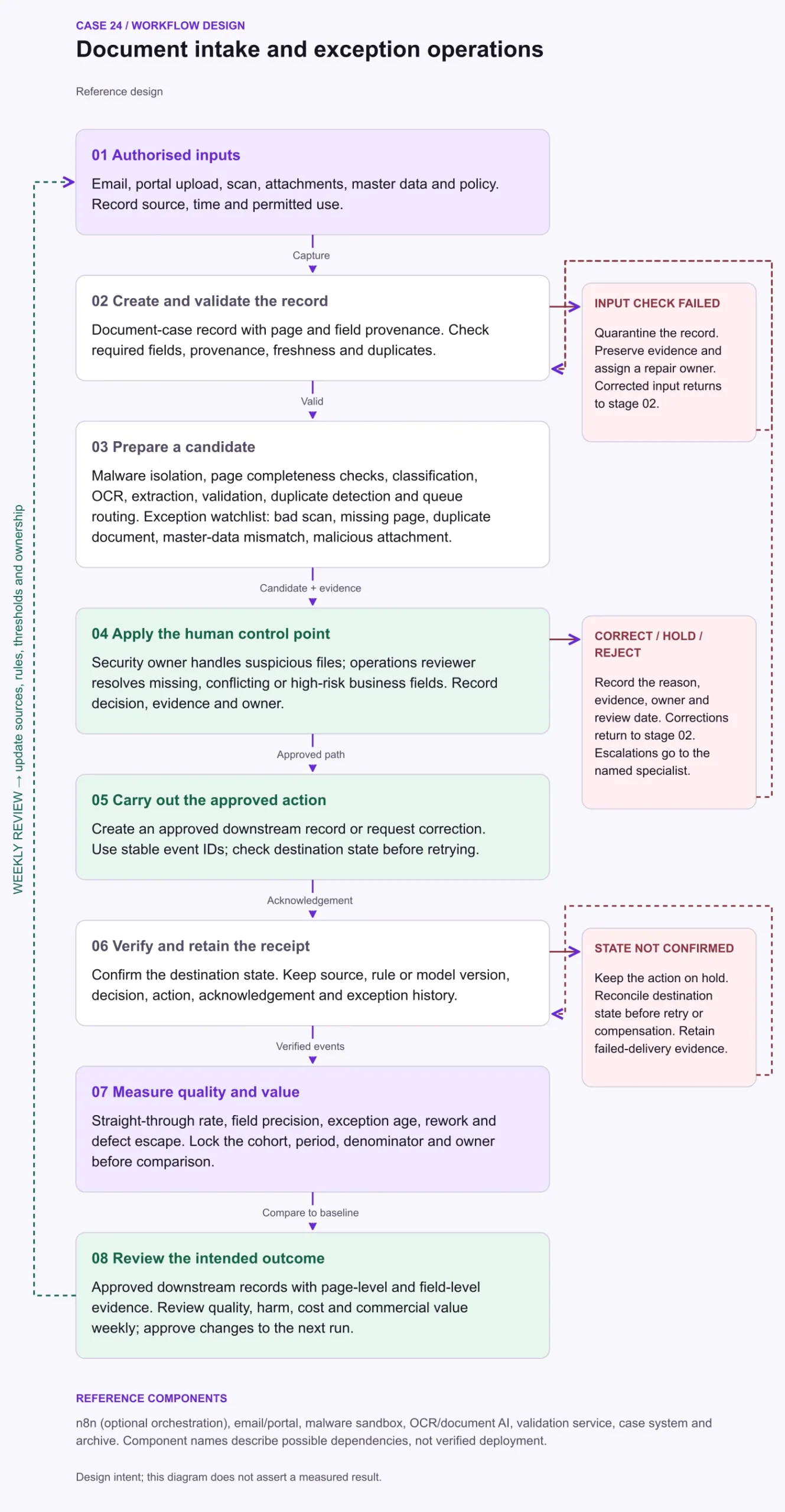
Composite reference architecture. A modelled implementation; no straight-through rate or staffing outcome is claimed.
What is document intake automation?
Document intake automation turns authorised emails, uploads and scans into validated business records with field-level provenance. It combines safe file handling, classification, extraction, validation, exception review and a verified downstream write; OCR alone only converts visible content into machine-readable text.
The operating problem
Documents arrive by email, portal and scan with different layouts and incomplete evidence. Extraction accuracy alone does not show whether the downstream transaction is safe to create.
How BergLabs runs document intake
In our in-house reference pattern, BergAuto isolates, classifies, extracts and validates eligible documents. BergFlow keeps every candidate field tied to its page, source file, validation result and reviewer decision.
Rosterr operates the controlled exception queue; Quinn supports specialist eligibility for regulated or high-risk document types; and Charterr supports managed capacity as volume changes. This describes a BergLabs reference workflow, not a measured client outcome.
How the workflow works
Isolate incoming attachments, check file safety and page completeness, then classify and extract. Keep each field linked to its page and source so a reviewer can resolve uncertainty quickly. Compare candidate fields with permitted values and master data. Duplicate detection needs document and business-record identity, because a renamed file may still represent the same transaction.

Where review and controls matter
Unreadable scans and absent pages should become explicit evidence requests. Suspicious attachments belong in a security route rather than an ordinary business queue. Reviewers correct the case record and re-run validation before approving the downstream write. Confirm the destination record after creation and preserve the decision trail so a retry cannot silently create a second transaction.
Risk reference: NIST AI RMF.
What to measure
Use a fixed cohort and measurement window. Count numerator events only within the denominator's eligible cohort; sampled measures use the same audit sample for both terms. Record the source, exclusions and owner, and keep missing data visible. These definitions are proposed measurement contracts, not observed results.
| Measure | Definition and unit |
|---|---|
| Straight-through rate | Cases reaching a validated record without manual correction divided by eligible received cases; percent. Separate final approval from data preparation. |
| Field precision | Extracted field values judged correct divided by audited extracted values; percent, by field. Report missing-field recall separately. |
| Exception age | Time since exception creation for open cases at the reporting cutoff; median and p90 hours. |
| Rework | Cases returned for correction divided by reviewed cases; percent. |
| Defect escape | Created downstream records with confirmed intake defects divided by audited created records; percent. |
Document intake automation FAQ
How is document intake automation different from OCR?
OCR converts image content into text. Document intake automation also classifies the document, validates fields against business rules, resolves exceptions and confirms that the approved downstream record was created once.
When should a document go to human review?
Route missing pages, unreadable scans, conflicting values, suspicious files, uncalibrated fields and high-risk decisions to an authorised reviewer with the source evidence visible.
How do you prevent duplicate downstream records?
Check both document identity and business-record identity, give each approved write a stable action ID, and verify the destination state before retrying.
A useful first pilot
Select one document type and destination record. Include a missing page, poor scan, duplicated attachment and master-data conflict. Verify the field evidence and destination state for each accepted case.
Bring the workflow, its source records and the decision that needs an owner to a BergLabs pilot discussion.
